U might have seen many of the techinical interview by Perl creator but this interview is more about person Larry Wall u might not have heard off.

Tuesday, August 20, 2013

Friday, August 16, 2013
How to Write a Linux Virus in 5 Easy Steps (Courtesy Tom's Hardware)
It's easy for people to pick at Windows for being prone to virus and malware attacks. It's almost a given belief that if you're running a PC with a Windows operating system, you're much more susceptible to attacks than users with other operating systems.
But let's quickly look at the reasons for this. First, it isn't really Microsoft's fault. It isn't that Windows is technically inferior, it's that the majority of the world runs on Windows. This fact alone is very attractive for any virus coder or exploiter. As a virus writer, you'd want to attack the majority, not the minority.
Monday, August 5, 2013
Emoji emoticons cheetsheet for GitHub
Hi All,
 If you want your commits or comments in github bit more articulate and want to include emoticons, here is a complete link that maintains all the funny picture supported by various popular software like github (the social coding ) or git lab etc
Check out below link the listed emoji supported by the listed tool that u can make use of and add bit some seriousness in your commit ;) .
emoji cheet sheet
 If you want your commits or comments in github bit more articulate and want to include emoticons, here is a complete link that maintains all the funny picture supported by various popular software like github (the social coding ) or git lab etc
Check out below link the listed emoji supported by the listed tool that u can make use of and add bit some seriousness in your commit ;) .
emoji cheet sheet
Monday, July 22, 2013
Rubular : a regex syntax development editor
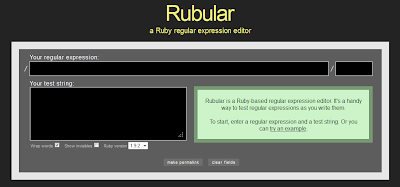
If u have developed some parser in Perl,Ruby, Shell script ans Python , then you must have came across regular expression (regex).
Regular expression is consider strength of these scripting language.
If you want to test your regular expression for the test you have to parse or to develop a regular expression that can get or match your specific condition ... rubular can be handy tool to do this job.
It has text box to input your regular expression and box to give ur sample test text.
Give a try friends.
Tuesday, July 16, 2013
Sublime text : How to fix OSError: [Errno 1] Operation not permitted (when opening file with sublime text 2)
Recently Sublime released its new version 2.0.2 and if you want to continue with sublime you , u need it to update to the latest version
you can use the command to update the sublime text 2 using terminal:
sudo add-apt-repository ppa:webupd8team/sublime-text-2
sudo apt-get update
sudo apt-get install sublime-text
Now type the command to evoke the editor, if it throwing the below error that you can follow below tutorial
Unable to run package setup:
Traceback (most recent call last):
File "./PackageSetup.py", line 165, in upgrade
upgradePackage(pkg, pristinedir, datadir, backupdir)
File "./PackageSetup.py", line 158, in upgradePackage
os.path.join(backupdir, base), inhibitOverwrite)
File "./PackageSetup.py", line 113, in upgradeArchive
shutil.copy(src, dst)
File ".\shutil.py", line 89, in copy
File ".\shutil.py", line 66, in copymode
OSError: [Errno 1] Operation not permitted: '/home/rubix/.config/sublime-text-2/Pristine Packages/AppleScript.sublime-package'
you can use the command to update the sublime text 2 using terminal:
sudo add-apt-repository ppa:webupd8team/sublime-text-2
sudo apt-get update
sudo apt-get install sublime-text
Now type the command to evoke the editor, if it throwing the below error that you can follow below tutorial
Unable to run package setup:
Traceback (most recent call last):
File "./PackageSetup.py", line 165, in upgrade
upgradePackage(pkg, pristinedir, datadir, backupdir)
File "./PackageSetup.py", line 158, in upgradePackage
os.path.join(backupdir, base), inhibitOverwrite)
File "./PackageSetup.py", line 113, in upgradeArchive
shutil.copy(src, dst)
File ".\shutil.py", line 89, in copy
File ".\shutil.py", line 66, in copymode
OSError: [Errno 1] Operation not permitted: '/home/rubix/.config/sublime-text-2/Pristine Packages/AppleScript.sublime-package'
Tuesday, July 9, 2013
zumbl - website/app to chat stranger

Hi All,
if you have some free time and really do not know what to do .... this might post might be interesting to you.
Recently I came across an app called "zumbl" where you can "chat as stranger to a stranger".
How it is different from other web service like omegle
first it message chat so no cam required
second it has do and donot and kind of moderated chat.
So person you are chatting with can assign you "tags" and "scores" and if you accumulated too much negative score you might be even get banned for couple of day.
SO what r u waiting for ... just go ahead download this app and experience it yourself.
Wednesday, July 3, 2013
The case for updating ubuntu if you are a 12.04 or 12.10 user
I am a user of Ubuntu 12.10 (Quantal Quetzal) user and have been getting the usual prompts from canonical to upgrade to 13.04. Well on paper both look almost the same. So I decided to try out the latest Ubuntu named Raring Ringtail. So I took out my old but still trustworthy acer laptop (The specs are core2duo 2ghz and 4GB RAM) and updraded my linux distro.
Well first look it looked the same but onceI clicked on the Unity icon I discovered a new set of snazzy icons. I was impressed as it gave a premium feel to the whole GUI (think apple). The laptop did respond a trifle better and over a period of few days noticed the resource usage and memory usage was improved . But then I was still facing the system errors which were a common feature in Quantal Quetzal. Some things never change so much so for being snazzy as an APPLE. But anyways I liked the latest iteration but as a general user didn't find much of improvements when it came to Quantal Quetzal.
Now comes the key question to upgrade or not? Well if its work we are talking about I would still stick to the 12.04 precise pangolin release just for the fact that it has a 5 year support cycle while Quantal Quetzal has a 18 month update cycle while the latest Raring ringtail its just 9 months. So no more security patches for raring Ringtail while precise Pangolin smokes out all the competition to all the other releases. When it came to choose between Precise Pangolin and Quantal Quetzal I was happy to upgrade because Quantal Quetzal provided way much more in terms of eye candy and some fancy packages but after the upgrade I had realised that precise Pangolin was a real good release with less memory and CPU utilization as compared to Quantal Quetzal. Well the eye candy does come at a cost.
So my verdict If you are on Precise pangolin then its a no brainer to update to the Raring Ringtail update but if on the Quantal Quetzal well its a 50-50 split opinion to upgrade or wait till september for the next iteration.
Subscribe to:
Posts (Atom)